🐍
Publish your packages
Table of contents
You want to publish your own packages? this note about it. There are several steps to publish the package.
Step 1
Install setuptools, twine, wheel as global with below command
terminal
pip install setuptools twine wheel
Step 2
Beside package directory create test and data directories and README.md and LICENSE and setup.py files
- You can see all license in: https://choosealicense.com

Step 3
In setup.py you should write this code
python
import setuptoolsfrom pathlib import Pathsetuptools.setup(name="mohsentest", # package name in pypi.org and should be uniqueversion=1.0,long_description=Path("README.md").read_text(), # insert readme file to the projectpackages=setuptools.find_packages(exclude=["test", "data"]) # don't include test and data directory to the package)
Step 4
Build source and build distributions with the below command
terminal
python setud.py sdist bdist_wheel
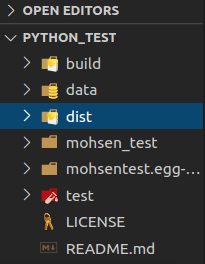
Finall step
Upload the dist directory files and folders to the pypi.org with below command
terminal
twine upload dist/*