Advance Topic in Express
Table of contents
What is advance topic?
- Middleware
- Configuration
- Debugging
- Templating Engines
What is Middleware?
Middleware functions are functions that have access to the request object ( req ), the response object ( res ), and the next function in the application's request-response cycle.
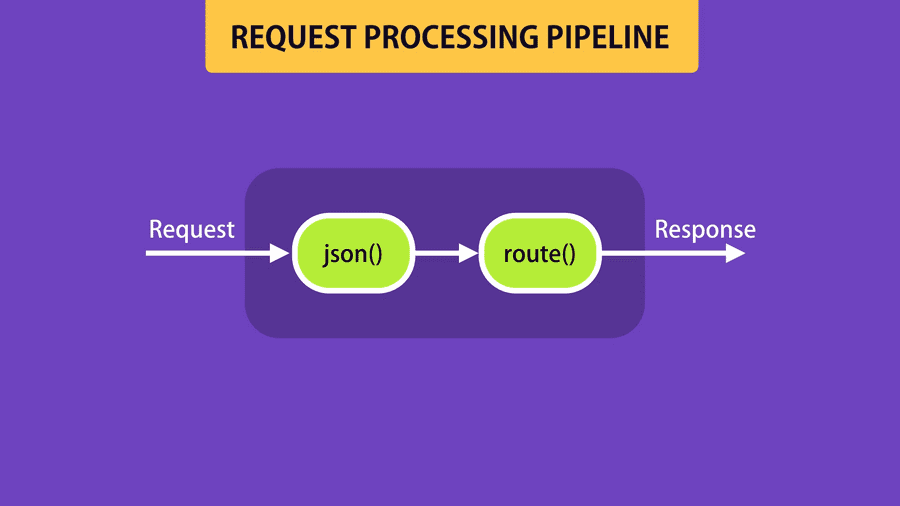
For example see below code
app.use(express.json()) // Middleware...app.delete('/api/courses/:id', (req, res) => {// Middlewarepass})
The diagram of above code is
Create Custom Middleware
app.use(function (req, res, next) {console.log("Loggg");next(); // it's important if you don't write the request processing pipline has got hange})
Built-in Middleware
app.use(express.urlencoded({ extended: true })) // it's not usefull nowapp.use(express.static('public')) // this middleware for serve static files and argument is folder name
Third-party Middleware
We can read a complete list of third-party middleware in tis link
there are two common middleware:
- helmet: Helmet helps you secure your Express apps by setting various HTTP headers.
- morgan: HTTP request logger middleware for node.js
Note
Use middleware a lot is an effect on performance
Diffrent Environments
We want to set diffrent ENV for test, develope and production. we can do this with set env. the variable name for Environment is NODE_ENV. there are two ways to read this variable:
- process.env.NODE_ENV --> if not set return undifine
- app.get('env') --> if not set return development
Configuration
We use config package to handel our configuration in diffrent environment. For work with this package create folder that name is config and in this folder create json files of our configuration in each environment. For more information read document link
Debugging
We prefer to use debug package instead of console.log. It's work easily import package to file with require like below
const debug = require('debug')('app:test')// app:test is name space// we can have multi debug in same file with diffrent name space
instead of use consol.log() in our code we use debug("..."). For specifid debug show in the consol or not use below command
export DEBUG=app:testorexport DEBUG=
if you run faster you can use below command
DEBUG=app:test nodemon app.js
Templating Engines
Template is not use full now because a lot's of application use rest-ful api. The package that we use for template engine is pug.
Database Integration
We can use diffrent databases with nodejs and express for more information go to this link
Structure in Express App
In real wrold application we should have separate routes and middlewares in separate folder it's very important to have clean and maintainable code. In routes folder we have separate file for each entity and change code like this:
const express = require('express')const router = express.Router();router.get('/', (req, res) => {pass});...module.export=router;
Summery
Express: Advanced Topics So, in this section, you learned that:
A middleware function is a function that takes a request object and either terminates the request response cycle or passes control to another middleware function.
Express has a few built-in middleware functions:
- json(): to parse the body of requests with a JSON payload
- urlencoded(): to parse the body of requests with URL-encoded payload
- static(): to serve static files
You can create custom middleware for cross-cutting concerns, such as logging, authentication, etc.
Custom middleware (applied on all routes)
JSapp.use(function(req, res, next)) {// ...next();}Custom middleware (applied on routes starting with /api/admin)
JSapp.use(‘/api/admin’, function(req, res, next)) {// ...next();}We can detect the environment in which our Node application is running (development, production, etc) using process.env.NODE_ENV and app.get(‘env’).- The config package gives us an elegant way to store configuration settings for our applications.
We can use the debug package to add debugging information to an application. Prefer this approach to console.log() statements.
To return HTML markup to the client, use a templating engine. There are various templating engines available out there. Pug, EJS and Mustache are the most popular ones.